Cara Mematikan Windows Update di Windows 10 & 11 (Permanen dan Aman)
Cara Mematikan Windows Update di Windows 10 & 11 (Permanen dan Aman)

Kenapa Perlu Mematikan Windows Update?

Windows Update memang penting untuk keamanan dan pembaruan fitur, tetapi kadang:

  • Update muncul di waktu yang tidak tepat, misalnya saat sedang kerja.
  • Menghabiskan kuota internet.
  • Membuat sistem restart sendiri tanpa izin.

Kalau kamu ingin menonaktifkan update sementara atau permanen, ada dua cara yang bisa kamu pakai: lewat services.msc dan lewat aplikasi Windows Update Blocker (WUB).


1. Cara Mematikan Windows Update Lewat Services.msc
Metode ini menggunakan layanan bawaan Windows tanpa aplikasi tambahan.
Langkah-langkah:

1. Tekan Windows + R, lalu ketik:

services.msc

    dan tekan Enter.

2. Cari layanan bernama Windows Update.
3. Klik kanan → Properties.
4. Pada bagian Startup type, ubah menjadi Disabled.
5. Klik tombol Stop jika statusnya sedang Running.
6. Klik Apply → OK.
7. Tutup jendela Services dan restart komputer.

Hasil: Windows Update tidak akan berjalan otomatis lagi.
Namun, cara ini kadang bisa diaktifkan kembali oleh sistem setelah pembaruan besar (major update)


2. Cara Mematikan Windows Update dengan Windows Update Blocker (WUB)

Metode ini jauh lebih mudah dan efektif untuk pemula, karena hanya perlu satu klik.

Langkah-langkah:
1. Unduh Windows Update Blocker (WUB) dari situs resmi: 
    https://www.sordum.org/9470/windows-update-blocker-v1-7/ 
    atau download disini

2. Ekstrak file ZIP hasil download.
3. Jalankan file Wub.exe (klik kanan → Run as Administrator).
4. Pilih opsi “Disable Updates”.
5. Centang “Protect Services Settings” supaya sistem tidak bisa mengubahnya lagi.
6. Klik Apply Now.
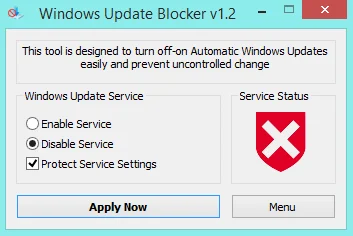
Windows Update Blocker

Hasil: Windows Update benar-benar mati permanen.
Kamu bisa mengaktifkannya kembali dengan memilih “Enable Updates” dan klik Apply Now.

×
Windows

6 Komentar

Avatar
kelvinlight122
20 March 2026
Hello there! This is my 1st comment here so I just wanted to give a quick shout out and say I truly enjoy reading your blog posts. Can you suggest any other blogs/websites/forums that deal with the same topics? Thanks!
Avatar
leticialair694
21 March 2026
Hi! I realize this is kind of off-topic however I had to ask. Does managing a well-established website such as yours require a large amount of work? I'm brand new to writing a blog but I do write in my journal on a daily basis. I'd like to start a blog so I can share my personal experience and feelings online. Please let me know if you have any recommendations or tips for new aspiring blog owners. Appreciate it!
Avatar
wearnematt640
28 March 2026
Excellent post. I was checking constantly this blog and I'm impressed! Extremely useful information particularly the last part :) I care for such information a lot. I was looking for this particular information for a very long time. Thank you and best of luck.
Avatar
jestinecrandall121
09 April 2026
I'm extremely impressed with your writing skills as well as with the layout on your blog. Is this a paid theme or did you modify it yourself? Either way keep up the excellent quality writing, it's rare to see a great blog like this one today.
Avatar
isaacsmari883
10 April 2026
Hi there! I just wanted to ask if you ever have any problems with hackers? My last blog (wordpress) was hacked and I ended up losing a few months of hard work due to no data backup. Do you have any methods to stop hackers?
Avatar
dinamathes81
11 April 2026
Hi to all, how is the whole thing, I think every one is getting more from this web site, and your views are pleasant for new viewers.

Tinggalkan Komentar